Dars Unlock Tool V5.4 (2026) is a great free solution for mobile technicians and people doing unlocking work. In this article, you’ll find the direct download link for this tool, along with details on new features like Samsung Exynos FRP bypass, Apple Boot Diag support, and Qualcomm loaders. If you want login access to UnlockTool without any paid subscription, and want to unlock your Android or Apple devices, this guide and download link will be very helpful for you.
The new version of Dars Unlock Tool, V5.4, is a major update for people working in the mobile repairing and unlocking field. This tool specifically works together with UnlockTool software and gives you login access without needing any paid account. If you’re dealing with Samsung FRP lock, Apple Boot Diag, or Qualcomm loader issues, this latest build is a solid solution for all of them.
What is Dars Unlock Tool?
Dars Unlock Tool, also known as DarsUnlocker, is a Windows-based bypass loader that integrates with the UnlockTool application. Its main job is to run a local server on your PC that handles login and license requests, which is what gives you full access to the tool without needing a paid subscription. It isn’t a standalone unlocking software on its own, rather, it works alongside UnlockTool to unlock its capabilities for free.
Dars Unlock Tool V5.4 – What’s New in This Update?
Samsung Exynos FRP Servicing: You can now bypass the FRP lock on Samsung Exynos devices directly from Odin Download Mode, without enabling ADB.
Wide Exynos Chipset Support: This version supports chipsets like Exynos 850, 990, 1080, 1280, 1380, 1480, 1580, 2100, 2200, 2400, 2500, and 2600.
Android 15, 16 & 17 Support: Compatibility has been added for newer Android versions and security patches up to One UI 9.0.
Qualcomm Loader Updates: New Qualcomm loaders have been added for several Samsung models, like the Galaxy Tab A9+, Galaxy S7, Galaxy A23 5G, Galaxy Z Flip4, and Galaxy Z Fold6.
Apple Boot Diag Support: Supports Boot Diag functions for devices with Apple A12 and A13 chipsets, including the iPhone 11 series, iPhone XS, XR, SE 2020, and iPad Air 3.
Hello Bypass Improvement: Fixed the issue where the screen wouldn’t automatically turn off after the Hello Bypass process.
VPN Restriction & Server Error Fixed: The earlier VPN restriction and “No server could be reached” error has been removed.
Dars Unlock Tool V5.4 – Supported Brands & Chipsets
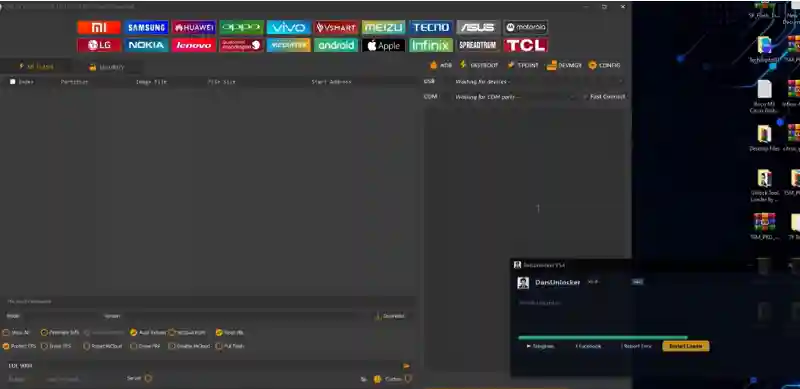
This tool covers a broad range of brands and chipsets:
Key Operations: FRP bypass, FRP erase, factory reset, bootloader unlock/relock, MediaTek firmware flashing, Qualcomm EDL flashing, Apple iCloud bypass, Vivo V-Account bypass, and demo mode removal.
Dars Unlock Tool V5.4 – System Requirements
For the tool to run smoothly, your system should have these minimum requirements:
Requirement
Details
Operating System
Windows 7, 8, 10, or 11 (64-bit recommended)
RAM
4 GB or more
Processor
Intel or AMD
Storage
At least 1 GB free space
USB Connection
Necessary (working USB cable)
Internet
Necessary for login-based access
How to Download and Install Dars Unlock Tool V5.4
Installation Steps:
Download the RAR file from the download link given in the table list above.
Right-click the file and extract it into a separate folder.
Make sure to scan it with antivirus after extracting (these tools often trigger false positives).
Open the installer file by running it as Administrator.
Tick all the checkboxes during setup and wait for the loader to fully load.
Don’t open UnlockTool manually, the loader will launch UnlockTool on its own.
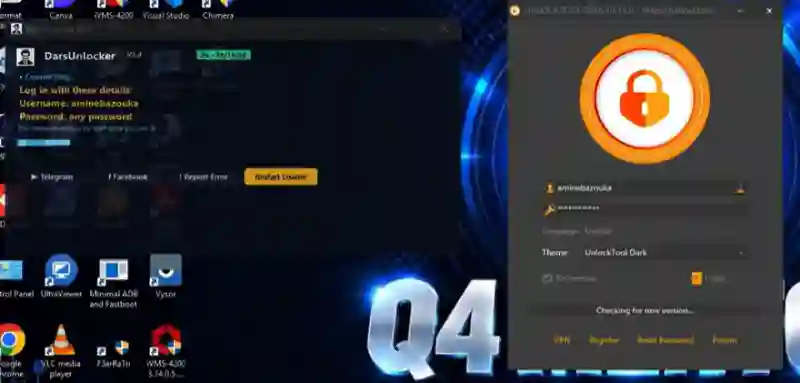
Once the Login button becomes clickable, click Login. The loader will enter the username and password itself.
Dars Unlock Tool V5.4 – Important Notes & Precautions
Antivirus Alerts: This tool interacts with system files, so antivirus can often flag it. You might need to temporarily disable your antivirus before installing.
Login Access: This tool uses a login-based system, so you might need valid account details.
No Unnecessary Updates: If your current version is running without any errors, there’s no need to update it.
USB Connection: Don’t disconnect the USB cable during the process, otherwise the device can get bricked.
Backup: Make sure to back up your important data before starting any flashing or FRP operation.
Can I use Dars Unlock Tool for free?
Yes, Dars Unlock Tool gives you free login access to UnlockTool, but this isn’t official free software. It’s a third-party bypass loader that bypasses the checks of the paid UnlockTool.
What is a good free unlock tool for Android phones?
Dars Unlock Tool is a great option for people who want to do FRP unlock, flashing, and bootloader operations without a paid subscription. But along with this, you’ll also need to install a compatible version of UnlockTool.
Advertisement
Is there a free download for Unlock Tool for PC?
Yes, the direct download link for Dars Unlock Tool V5.4 is given earlier in this article. You can download it from MediaFire.
What is the login problem in Dars Unlock Tool?
Users often run into a login issue. The most common reason for this is an outdated version or a server connection error. In V5.4, the “No server could be reached” error has been fixed, but if the problem still shows up, update your tool and use a stable internet connection.
Which phones are supported by Dars Unlock Tool?
Major brands like Samsung, Xiaomi, Redmi, POCO, Vivo, OPPO, Realme, Huawei, Honor, Apple, Tecno, Infinix, Motorola, Nokia, LG, and ZTE are supported.
Final Words :
Dars Unlock Tool V5.4 is a powerful, updated solution for technicians who want to take advantage of UnlockTool’s capabilities without a paid account. New features like Samsung Exynos FRP, Apple Boot Diag, and Qualcomm loader have been added, making it a must-have tool for 2026. Just install it the right way, and make sure to keep a backup of your device.