Unlock Tool 2026 – Remove Samsung FRP on Android 16 | Via COM MTP
Advertisement
Remove Samsung FRP on Android 16 Security : If your Samsung phone is stuck on the Google verification lock screen after a factory reset, Unlock Tool 2026 can remove the FRP lock through COM MTP. This method works on Samsung devices running Android 16, and it don’t need download mode or any key combination — the Samsung phone just connects to the PC over MTP COM port and the tool does the rest.
What Is COM MTP Mode
MTP (Media Transfer Protocol) is the mode your Samsung uses when you plug it into a computer to transfer files. In Windows Device Manager, the phone shows up under a COM port or as an MTP device. Unlock Tool talks to the phone through that USB connection to reach the FRP data and clear the Google account lock. It’s one of the simplest FRP bypass methods because there’s no special boot mode involved.
Before You Start
Download and install the latest version of Unlock Tool 2026 on a Windows PC. You’ll also need a good USB cable — cheap cables cause half the “device not detected” headaches people run into. Install the Samsung USB drivers first, then run the tool as administrator. And make sure you’re working on your own device or one you have permission to service.
How to Remove Samsung FRP on Android 16 Via COM MTP
Connect Samsung In MTP Mode
Power on the Samsung android device and show Google FRP lock Disply ,you connect wifi and Plug it into the PC with the USB cable. If the phone asks which USB mode to use, choose file transfer (MTP), but mostly if your pc USB driver is ok Unlock Tool auto detect MTP COM port . remember you do this process MTP COM Port mode , don’t use Download Mode Remove FRP Lock Samsung Device .
Connect Samsung MTP Com Port To Unlock Tool
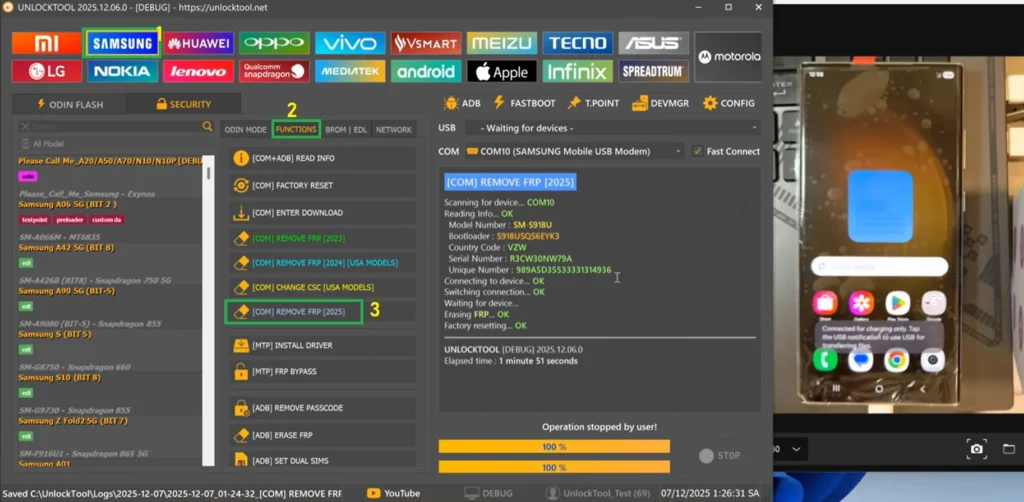
Open Unlock Tool 2026 , go Samsung Tab in Top Header , Click Security Tab and go Functions option, click ” [COM] Remove FRP [2025] , Unlock Tool Dedect Samsung MTP COM port and start read Samsung device info and erase FRP Lock Samsung Device in MTP COM port mode .
What the Log Looks Like When It Works
- [COM] REMOVE FRP [2025]
- Scanning for device… COM10
- Reading Info… OK
- Model Number : SM-S918U
- Bootloader : S918USQS6EYK3
- Country Code : VZW
- Serial Number : [hidden]
- Unique Number : [hidden]
- Connecting to device… OK
- Switching connection… OK
- Waiting for device…
- Erasing FRP… OK
- Factory resetting… OK
- UNLOCKTOOL [DEBUG] 2025.12.06.0
- Elapsed time : 1 minute 51 seconds
Erasing FRP… OK” is the line you’re waiting for. Everything before it is just the tool shaking hands with the phone.
A Quick Note
This guide is for removing the FRP lock from a Samsung device you own or are authorized to service. Bypassing the Google lock on someone else’s phone without permission isn’t okay, and I can’t help with that.