Unlock Tool 2026 – Moto G05 FRP Unlock | Test Point Method
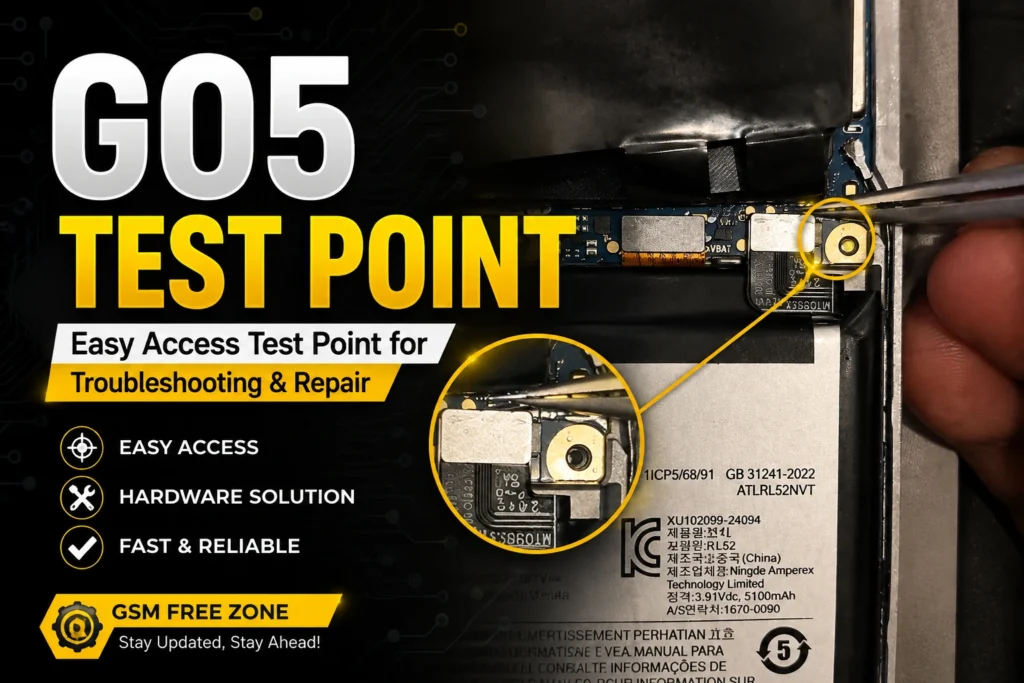
Truth is, remove the Moto G05 FRP lock with Unlock Tool in just a few minutes. Simple as that. The Moto G05 ships with an advanced security patch that blocks the normal boot modes, so the usual methods won’t work here. To unlock FRP on the Moto G05, you need to boot the phone through its test point and then connect it to the computer. Simple as that. Honestly, this post walks you through the whole process with all the help and info you need.
Step-by-Step Instructions, honestly.
for Moto G05 FRP Unlocking you need unloack tool latest version , but some time unlock tool server not do this device , show DA error , some time i do personally and test worked, but some time same model i face problem , unlock tool show error removing FRP Lock Moto G05 . For this i share here 100% tested solution and your shift unlock tool to AMT Tool . now follow AMT Tool guide line .
Install the MediaTek VCOM Driver:
Before you plug in the G05, make sure the PreLoader USB VCOM driver is installed on your Windows PC. That matters. Without it, the AMT Tool won’t detect the phone. You can grab the driver from downloadunlocktool.com if you don’t have it.
Get this: launch AMT Tool and connect the Device :
OK so, open Android Multi Tool (v1.3.0.9 or newer) as administrator. That matters. Power off the Moto G05, then connect it to your PC via USB. The tool will automatically start searching for the device – you’ll see “Searching for usb device…” in the log.
Confirm Device Detection and Chip Info: — at least that’s how I see it.
Once the tool finds the phone, it reports the port – e.g., “Found MediaTek PreLoader USB VCOM_V1632 (Android) (COM5)”. Think about it. Then it reads the chipset: MT6768 [Helio P65/G85 K68V1] and displays system details like Android 15 and the build number. If you see errors here, double-check your drivers and cable.
OK so, let the Tool Format the FRP Partitions :
Look, the AMT Tool automatically sends a download agent and reads partition info. Simple as that. Then it formats the desired partition – you’ll see “Formatting desired partition… Ok” twice in the log. This clears the FRP data — at least that’s how I see it. For real. Truth is, you don’t have to click anything; it’s all automatic.
Reboot and Verify :
Here’s the thing — after formatting, the tool reboots the device – you’ll see “Rebooting device… Ok”. And that’s key. The whole thing takes about 29 seconds, as the log confirms. Once the phone restarts, the FRP lock is gone, so oK so, set it up with a fresh Google account.
Common Problems and Fixes :
Get this: even with a solid G05 Test Point -Moto G05 FRP Unlock 2026 Full Guide Explain, things can hiccup. True story. Most issues are easy to sort out – here’s what usually trips people up and how to get back on track.
Honestly, device Not Detected (Stuck on “Searching for usb device”)
then there’s this — is almost always a driver issue, while make sure the MediaTek PreLoader VCOM driver is properly installed. Here’s why. Also try a different USB port, a shorter cable, and restart the AMT Tool as administrator. OK so, i’ve seen a simple cable swap fix this more times than I can count.
Advertisement
Tool Crashes or Hangs at “Sending Download-Agent” — at least that’s how I see it.
Get this: usually a permissions problem – run the tool as administrator. True story. Also, turn off your antivirus temporarily; some security software blocks the communication. And check that your phone’s battery is above 50% – a low battery can interrupt the process.
Still stuck? For Real
Sometimes the tool version matters, and that matters. Grab the latest AMT from androidmultitool.com or check downloadunlocktool.com for driver packs. Think about it. And if you get an error about “partition”, try a various USB port – that’s fixed it for me.
Frequently Asked Questions
What is FRP and why does it lock the Moto G05?
FRP (Factory Reset Protection) is Google’s anti-theft feature. After a factory reset, the phone asks for the previous Google account credentials. If you don’t have them, you’re locked out. This guide shows how to remove that lock using the AMT tool.
Does the AMT tool work on Android 15 for the Moto G05?
Yes. The AMT Tool (v1.3.0.9) successfully unlocked a Moto G05 running Android 15 with the January 2025 security patch – as confirmed by the log. It reads the MT6768 chipset and handles the FRP partitions smoothly.
Will this FRP unlock erase my personal data?
The process performs a factory reset – it clears all user data and settings. But since you’re likely locked out anyway, you’re not losing anything you can access. Always back up if possible before starting.
How long does the Moto G05 FRP unlock take?
According to the actual log, the whole process – from detection to reboot – takes about 29 seconds. That’s from the moment the tool connects to the device. Fast and efficient.
Advertisement
Do I need to pay for the AMT tool to do this?
The AMT Tool is available for free from its official website. Some versions may have paid features, but the basic FRP unlock function used in this guide is free and works on the Moto G05.
Final Thoughts
Here’s the thing — so that’s the G05 Test Point -Moto G05 FRP Unlock 2026 Full Guide Explain in action. And that’s key. The AMT tool does exactly what it says – wipes the FRP in under 30 seconds and gets your phone back to a clean slate. No complicated hardware mods, no risky firmware flashes – just a simple USB connection and the right drivers. Truth is, if you run into any snags, double-check the driver installation and try a specific cable. For real. Most issues come down to that — at least that’s how I see it. And if you need the tool again or want to grab the latest version, downloadunlocktool.com keeps the files updated and ready. One last thing: Always back up your data before any unlock procedure – even though this method only targets the FRP partition, it does a factory reset. Honestly. Keep this guide bookmarked – it’s a reliable fix whenever you get a Google-locked G05.