Moto FRP Tool 2027 : Removing a Motorola FRP lock has gotten easier by 2027, but picking the right tool is still the biggest headache. When you factory reset your Motorola phone, the setup screen asks for the old Google account again, and if you don’t remember it, the phone just gets stuck there. That’s what’s called an FRP lock, and this post lays out the full solution. We compared the top 6 Moto FRP tools of 2027, MOTOFRP, Moto Unlock Tool, U-FRP Tool, Tenorshare 4uKey, and Moto Auto Flash Tool, so you know how each one works and what it costs. Some charge per device, some run on credits, some are subscription-based, and some are completely free. Along with that, there’s a step-by-step Fastboot bypass guide, walking through getting the phone into Fastboot mode, connecting it to a PC, selecting Erase FRP, and finishing setup, all explained in plain language. Whether you’re a technician or doing this for the first time, this guide will help you pick the right tool and clear the FRP lock.
What Is Moto FRP Tool 2027?
Moto FRP Tool 2027” isn’t the name of one single piece of software, it’s a whole group of tools used to bypass or remove the Google FRP lock on Motorola phones. When you factory reset your Motorola phone, the setup screen asks again for the same Google account that was synced on it before. That’s what’s called the FRP lock, short for Factory Reset Protection. If you don’t remember the account, the phone gets stuck right there on the setup screen, even though nothing’s actually wrong with it.
Here’s something worth knowing: Motorola’s official flash tools don’t have an FRP bypass option. That’s exactly why people turn to third-party tools instead. Most of these tools reset the lock through Fastboot mode or signed payloads. By 2027, there are several well-known tools out there for this, free ones, credit-based ones, and paid ones, all three kinds. In this post, we’ll compare all of them so you can pick the right one for what you need.
Below is a list of the tools most people search for and use for Motorola FRP removal. Each tool has its own method and pricing model, some charge per device, some run on credits, and some use a one-time license. Before picking a tool, it’s important to check whether your model and Android version are on that tool’s supported list, otherwise you could end up wasting your money. The table below sums up each tool’s mode of operation, key features, and pricing, and after that you can read a short rundown of each one.
MOTOFRP is a tool made specifically for Motorola FRP. It works through Fastboot and signed LK payloads, and claims to bypass even newer security patches. What’s notable is that diagnostics are free, while the actual FRP removal is paid per device. If you’re only doing one phone, this option could end up costly.
Moto Unlock Tool
Moto Unlock Tool works in Fastboot mode and supports Motorola phones from Android 11 up to Android 16. It runs on a credit-based system, meaning you buy credits and use them per phone. For technicians handling a lot of phones, the credit system usually works out better.
U-FRP Tool (Motorola Edition)
U-FRP Tool’s Motorola Edition erases FRP through both Fastboot and MediaTek (MTK) methods, and also unlocks the bootloader using stock LK images. It’s available on subscription, or for those who already have a U-FRP account. For MTK-based Motorola models, this is considered a solid option.
Tenorshare 4uKey for Android
4uKey is for people who want an easy interface. It’s desktop software that removes both screen lock and Google lock. For beginners, its interface is the simplest one around, but it comes under a premium license, so this isn’t the one for anyone looking for a free option.
Moto Auto Flash Tool
Moto Auto Flash Tool is a free community tool that flashes stock ROM in Fastboot mode, unlocks the bootloader, and also removes FRP. Since it’s free, it gets downloaded the most, but it doesn’t come with official support, so it’s best to read the guide carefully before using it.
The Magic Tool
The Magic Tool is an online service and tool built for Motorola phones, that handles FRP removal along with Network Unlock, IMEI Repair, Factory Enable, and MDM Removal. It runs on a credit-based system, meaning you first need to create an account on themagictool.net, and each service costs separate credits. Support for newer models is considered its strong point, but you should always check your model against the supported list before buying.
General Step-by-Step Moto FRP Bypass Flow
Most desktop tools follow pretty much the same method. No matter which tool you use, the order of steps stays the same. Below is that general flow, the one that usually works for Motorola FRP bypass.
Step 1 – Enter Fastboot Mode
Turn the phone completely off. Then press and hold the Volume Down and Power buttons together until the Fastboot or Bootloader screen shows up. This is the mode where the tool can communicate with the phone. If the phone doesn’t go into Fastboot, try the button combination again, or unplug the cable and plug it back in.
Step 2 – Connect the Phone to PC
Connect the phone to the computer with a good USB data cable. The Motorola ADB and Fastboot drivers should already be installed on your PC, otherwise the tool won’t detect the phone. If the phone shows up in Device Manager, that means the connection is working fine.
Advertisement
Step 3 – Execute FRP Removal
Open your tool and first verify the connection, most tools have a “Read Info” button that tells you the phone is connected properly. Then select the Erase FRP or Remove Lock option and start the process. Don’t move the cable while it’s running.
Step 4 – Complete Setup
The process usually takes about a minute to finish. After that, reboot the phone manually. When the setup screen asks for a Google login, you’ll see a “Setup Offline” option, that lets you finish the setup without needing the old account.
Moto FRP Removal with Unlock Tool
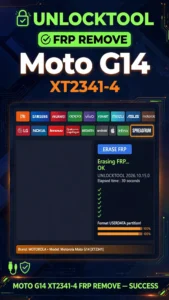
This site also covers the Unlock Tool method. For the Motorola Moto G14 (XT2341-4), the Erase FRP option in the Spreadtrum tab of Unlock Tool is used, first install the SPD Diag USB Driver on your PC, then click Erase FRP in the Spreadtrum tab and connect the phone via USB. This method works if your model is on the Spreadtrum (Unisoc) platform; for other models, it’s better to pick from the tools listed above based on your model. You can read the full step-by-step guide in this post: Moto G14 XT2341-4 FRP Remove (internal link: /moto-g14-xt2341-4-frp-remove/).
Moto Service Tool Download, Motorola FRP Code and Hard Reset Tool
People also search a lot for “Moto service tool” and “Moto service tool download.” Service tool means software meant for servicing the phone, flashing, FRP removal, bootloader unlock, and diagnostics, all of that falls under it. Before downloading, always get it from an official or well-known source, otherwise fake tools can carry malware. On the other hand, people searching for “Motorola FRP code” should know there’s no such thing as a universal code for FRP. Any website or video that claims to sell you a code is usually a scam, FRP gets removed through software methods, not through any code. Similarly, “Motorola hard reset tool” usually just means doing a factory reset through recovery, but a hard reset doesn’t remove FRP, in fact, the FRP verification screen only shows up after the reset. So after the reset, you still need one of the tools listed above to bypass FRP. There are also several tools out there under the name “Motorola tool,” so always pick the one that matches your specific model and chipset.
Chimera Tool – Is It for Motorola FRP?
Chimera Tool also shows up in “People also search.” It’s a professional servicing tool that supports several brands, including Motorola. It’s paid and built for professional technicians. Before buying it, make sure to check your exact model in its official supported models list, since not every model is supported for every function.
Can official Motorola tools bypass FRP?
No, Motorola’s official flash tools don’t have an FRP bypass feature. That’s why third-party tools are used for this job.
Is Moto FRP Tool 2027 free or paid?
Both kinds of options exist. Moto Auto Flash Tool is free and community-made, while MOTOFRP is paid per device, Moto Unlock Tool is credit-based, U-FRP comes on subscription, and 4uKey is under a premium license. The Magic tool is login credit-base.
Will a hard reset remove the FRP lock?
No, the FRP verification screen only shows up after a hard reset. After resetting, you still need to use a tool to bypass FRP.
Advertisement
Can an FRP code unlock the lock?
No, there’s no universal code for FRP. People selling codes are usually scammers, so stay away from them.
How do you get into Fastboot mode?
Turn the phone off, then press and hold Volume Down and Power together until the Fastboot or Bootloader screen appears.
Disclaimer: This guide is for educational purposes only. Only use it on your own phone, or on a phone you’re authorized to service.