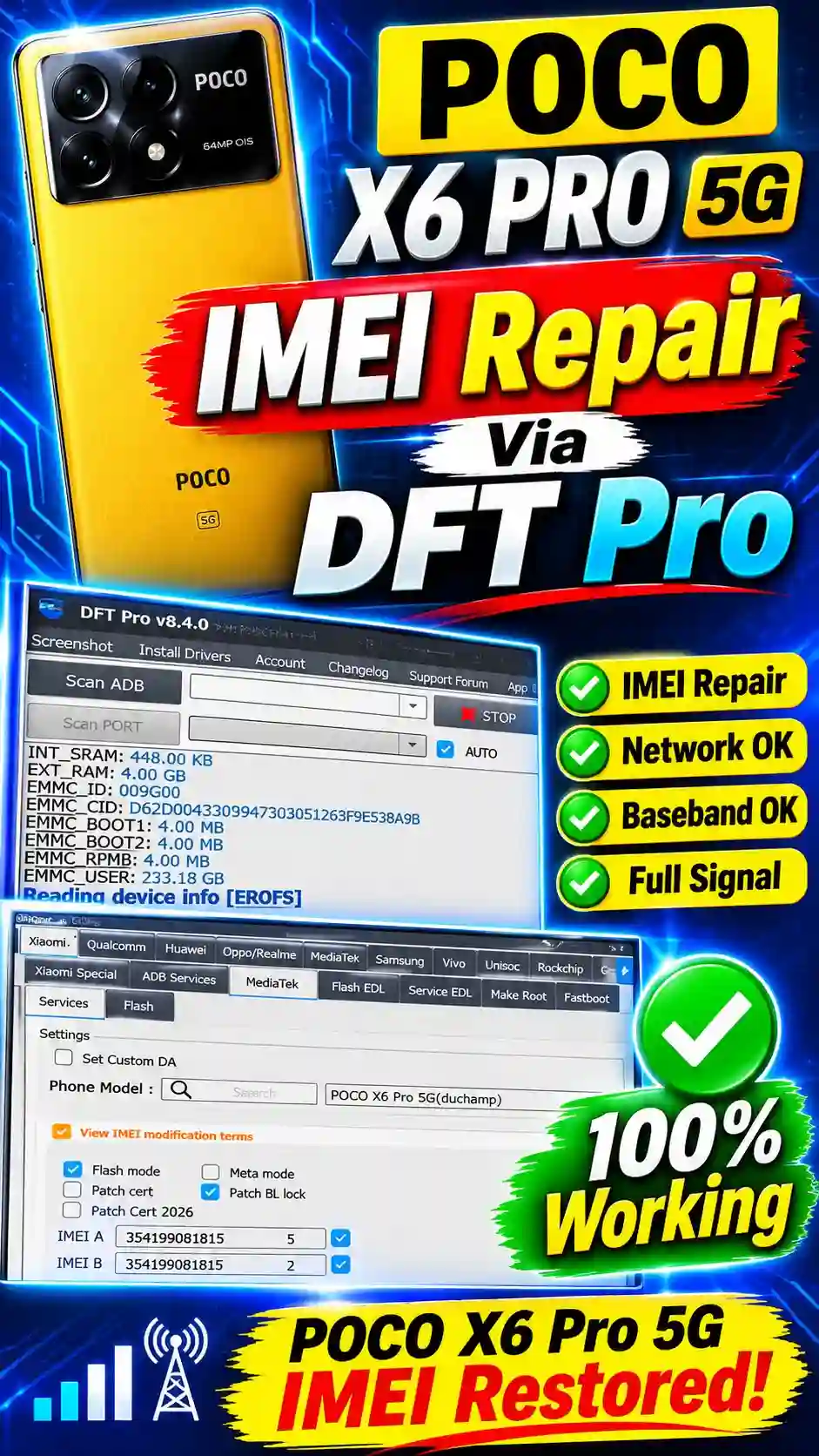
IMEI null or network issues are a common problem on the Poco X6 Pro 5G (duchamp). This guide walks you through the complete method for repairing IMEI via DFT Pro Tool. We’ll cover how to select the model from the Xiaomi tab, enable IMEI Repair and Flash mode, and connect the device in BROM mode. It also covers common errors that come up, and their easy fixes.
In this guide article POCO X6 PRO 5G IMEI Repair full explain how to setup by setup you fix your device IMEI problem , Poco X6 Pro 5G is a powerful Xiaomi smartphone that comes with the MediaTek Dimensity 8300-Ultra chipset. Sometimes, due to a software update, firmware flashing, or NV data corruption, IMEI-related issues can show up on this device. In such situations, the mobile network isn’t detected, the SIM signal disappears, or the device’s original IMEI information doesn’t display properly.
DFT Pro is a professional mobile servicing tool that has different service functions available for Xiaomi and MediaTek devices. Compatible servicing functions and device information checks can be used to diagnose software-related IMEI issues on the Poco X6 Pro 5G.
In this guide, [POCO X6 PRO 5G IMEI Repair ] we’ll explain the important points about the Poco X6 Pro 5G, DFT Pro, the MediaTek platform, the step-by-step IMEI repair guide via DFT Pro and its requirements, NVRAM-related problems, and restoring the original factory-assigned IMEI.
Poco X6 Pro 5G Specifications and MediaTek Platform
The Poco X6 Pro 5G’s codename is Duchamp. It’s based on the MediaTek Dimensity 8300-Ultra processor. This device uses Xiaomi’s customized Android software environment.
Important Device Information:
Device Name
Poco X6 Pro 5G
Model Codename
Duchamp
Processor
MediaTek Dimensity 8300-Ultra
Operating System
Android-based HyperOS
Service Platform
MediaTek
Servicing Tool
DFT Pro
Selecting the correct model and chipset matters during mobile servicing. Incorrect firmware, incompatible service files, or unauthorized NV data modification can affect baseband and network functionality.
What Is IMEI Repair in Poco X6 Pro 5G?
IMEI stands for International Mobile Equipment Identity. It’s the mobile device’s unique identification information, used to identify the device on cellular networks.
An IMEI-related problem on the Poco X6 Pro 5G can arise for several reasons:
IMEI information going missing after firmware flashing.
NV data corruption.
NVRAM-related software problems.
Baseband communication errors.
Incorrect firmware installation.
A failed software servicing operation.
The legitimate purpose of IMEI repair is to restore the device’s original, factory-assigned identity. Copying another device’s IMEI, or writing a new identity number, isn’t genuine repair.
DFT Pro Tool for Poco X6 Pro 5G
DFT Pro is a mobile servicing software that provides different diagnostic and repair-related functions for supported smartphones. MediaTek platform compatibility matters when servicing the Poco X6 Pro 5G. The model profile, software version, and supported operations available in the tool should be verified.
Before starting the service, confirm the following:
Available functions and compatibility aren’t the same in every software version. That’s why checking the official tool documentation before
How to Diagnose IMEI Problems on Poco X6 Pro 5G
To diagnose an IMEI-related issue, first check the device’s existing condition.
Step 1: Check Device Information
Open the phone’s dialer and enter *#06#. If the IMEI information doesn’t display, there could be an issue with the software or the device identification subsystem.
Step 2: Check Baseband Version
Open Settings and go to About Phone and the device information section. If the baseband version shows as unavailable or unknown, a firmware or modem-related problem should be investigated.
Step 3: Check SIM Network Status
Insert a working SIM card and check network registration. If the SIM is detected but no signal comes through, diagnose the network, firmware, and baseband issues separately.
Step 4: Verify Original IMEI Records
Compare the factory-assigned IMEI information against the device’s original retail box, purchase documentation, or authorized service records.
Step 5: Use Authorized Repair Support
If the original IMEI is missing or corrupted, get an authorized Xiaomi service provider to restore the original identity. Keep proof of ownership and original device records available for the repair.
Understanding NVRAM and EFS in MediaTek Devices
NVRAM and EFS-related data is associated with the mobile device’s important configuration and network information. On MediaTek-based smartphones, NVRAM corruption can cause some problems to appear:
IMEI information is unavailable.
Baseband version showing as unknown.
SIM network registration failure.
Network configuration errors.
Mobile connectivity problems.
That’s why, before modifying NV-related partitions during software repair, proper backup and professional diagnosis are necessary.
Common Poco X6 Pro 5G IMEI Repair Errors
Different errors can come up while working with DFT Pro or other servicing tools.
IMEI Null Problem:
The phone’s modem software isn’t communicating properly. Compatible firmware and modem diagnostics may be needed.
Baseband Unknown:
The device doesn’t display IMEI information. This can be caused by corrupted device data or a software-related issue.
SIM Not Detecting:
This could be a SIM tray, SIM card, firmware, or hardware-related issue.
USB Connection Failed:
Incorrect drivers, a damaged USB cable, or an unstable USB port connection can cause problems.
NVRAM Error:
There could be corruption or inconsistency in the device’s configuration data. Avoid random partition writing in this condition.
Advertisement
Important Precautions Before DFT Pro Servicing
Following a few precautions is very important when professionally servicing the Poco X6 Pro 5G.
Keep a backup of the original device data.
Verify the correct model and chipset.
Make sure the battery has sufficient charge.
Use a reliable USB cable.
Avoid unknown firmware and modified service files.
Preserve original IMEI records.
Don’t use another phone’s IMEI.
Don’t modify NV partitions without a proper backup.
Incorrect low-level servicing can permanently damage the baseband, mobile network, and device functionality.
Poco X6 Pro 5G IMEI Repair Via DFT Pro Tool
On the Poco X6 Pro 5G (codename: duchamp), the “IMEI null or unknown” issue is being seen fairly often these days, caused by MediaTek processor and baseband issues. If your phone isn’t picking up network signals, IMEI repair can be done through DFT Pro Tool. Below, we’ll walk you through the step-by-step method.
Things You Need Before Starting the Process
Before starting this process, you’ll need a few things. A Windows PC or laptop with the latest version of DFT Pro Tool installed (like v8.4.0). The Poco X6 Pro 5G’s original USB data cable, and proper drivers installed on the computer. Most importantly, the phone’s battery should be charged to at least 50% so it doesn’t shut off midway. Make sure to back up your phone’s data first, since this process can be a bit risky.
Step-by-Step IMEI Repair Guide POCO X6 5G
By following the steps below, you can easily repair your device’s IMEI. Read each step carefully, and select the correct options in the tool.
Step 1: Open DFT Pro Tool and Select Xiaomi Tab
First, open DFT Pro Tool on your computer. There will be tabs for different brands at the top of the tool’s interface, click on the Xiaomi tab.
Step 2: Navigate to Services and Select Model
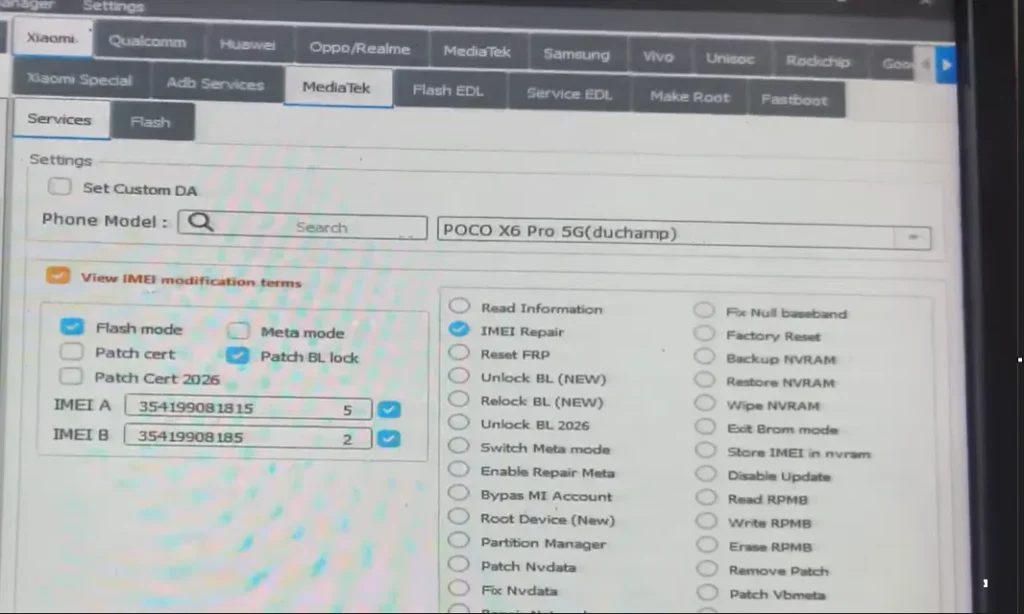
Once in the Xiaomi tab, click the Services option. Now there’ll be a search box on screen that says “Phone Model.” Search for Poco X6 Pro 5G there, and select POCO X6 Pro 5G (duchamp) from the dropdown menu.
Step 3: Configure IMEI Repair and Flash Mode
Now, among the options on the right side, tick the IMEI Repair checkbox. On the left side, tick “View IMEI modification terms” so the options further down unlock. After that, select Flash mode from the options below, and also tick Patch BL (Bootloader lock/unlock patch).
Step 4: Enter IMEI Numbers
On the left side, you’ll see boxes for IMEI A and IMEI B. Enter your phone’s original IMEI numbers in these boxes. Entering a wrong or cloned IMEI can ruin your phone’s network capabilities, so make sure to enter your genuine IMEI number only.
Step 5: Connect Device in BROM Mode
Now power off your Poco X6 Pro 5G phone. After turning it off, press and hold both the Volume Up and Volume Down keys together. While holding them, connect the phone to the computer via USB cable. The tool will detect the phone, and a green message will show up.
Step 6: Start the Repair Process
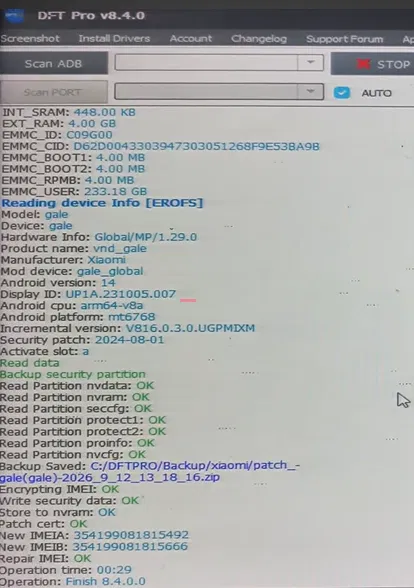
Once the tool detects the phone, click the Start button on the tool’s interface. The tool will automatically begin the process of writing IMEI onto your phone. Once the process finishes, an “Operation: Finish” message will appear. Now unplug the cable and turn the phone back on normally.
Troubleshooting Common Errors
If an error pops up during the process, there’s no need to panic. Here are some common errors and their fixes:
DAA_SIG_VERIFY_FAILED Error
This error often shows up when authentication bypass doesn’t work properly. If you run into this error, select the Disable Auth or Bypass Auth option in the tool, and start the process again.
Null Baseband or No Signal After Repair
If there’s still no signal on the phone after IMEI repair, or the baseband shows as null, it means your modem partition has gotten corrupted. To fix this, you’ll need to flash your phone’s official stock firmware.
u003cstrongu003eIs IMEI repair via DFT Pro safe?u003c/strongu003e
Technically, this is safe if you follow the right steps. But if the cable disconnects during the process, or the wrong firmware gets flashed, the phone can hard brick.
u003cstrongu003eWill the IMEI revert back after a firmware update?u003c/strongu003e
Yes, this happens often. A temporary IMEI repair done through DFT Pro can revert back to its original state (or null) after a firmware update (OTA) or a factory reset. So save your data and backup before updating.
Advertisement
Can DFT Pro Support Poco X6 Pro 5G?u003cbru003e
DFT Pro has Xiaomi and MediaTek servicing options available. But compatibility of specific functions for the Poco X6 Pro 5G should be verified against the installed version and official supported-device information.u003cbru003e
Why Is Poco X6 Pro 5G Showing Null IMEI?u003cbru003e
Possible reasons for a null IMEI include NV data corruption, firmware problems, baseband communication failure, and an unsuccessful software servicing attempt.
Can Firmware Flashing Fix IMEI Problems?u003cbru003e
Some firmware-related problems can be resolved by reinstalling compatible official firmware. But if the original NV data has gotten corrupted, flashing firmware alone isn’t enough.
Why Does Poco X6 Pro 5G Show Baseband Unknown?u003cbru003e
An unknown baseband can show up due to firmware incompatibility, modem software corruption, or hardware-related problems.
Can Original IMEI Be Restored After Software Corruption?u003cbru003e
If the original factory-assigned IMEI records are available and the device’s hardware condition is fine, an authorized service center can assess legitimate restoration.
Final Words
Solving Poco X6 Pro 5G IMEI Repair-related problems isn’t just about picking a servicing tool. Correct device identification, MediaTek platform compatibility, firmware condition, and NV data integrity also need to be understood.
DFT Pro is useful software for professional mobile servicing, but low-level device operations should always be performed according to supported procedures and the original, factory-assigned device identity. If the phone has a Null IMEI, Baseband Unknown, or network registration issue, contact a qualified technician or authorized service center for original IMEI restoration, rather than unauthorized modification.
Advertisement
Was this helpful?
Reviews
Review this file
Need help?
Typically replies within minutes
Hi! How can we help you today? Tap below to start chatting.