Unlock Tool 2026 – Redmi 10 Prime (Selene) Dead Boot Repair | Full Dump File Flash
Unlock Tool 2026 – Redmi 10 Prime (Selene) Dead Boot Repair | Full Dump File Flash
The Unlock Tool is widely used for Redmi 10 Prime (Selene) Dead Boot Repair. This is because the Unlock Tool is a mobile unlocking tool that can read and write the dump backup of any device model that has support for this feature. Because of this feature, most mobile technical masters prefer to use the Unlock Tool.
Dead-boot means that a mobile phone goes dead while being updated, while flashing, while repairing the IMEI, while unlocking the bootloader, or while rooting or booting. As a result, the phone screen shows nothing. When connected to a computer, it only creates a USB port. In this condition, to repair the dead phone, we need to read the dump backup of another phone of the same name and model and write it to the dead phone.
Full Dump File Flash On Redmi 10 Prime
If your Redmi 10 Prime device is in dead boot mode, you need to repair it with a full dump file flash. Download the Redmi 10 Prime full dump firmware from the download link. This Redmi 10 Selene dead-fix dump file is available for free download; download it, extract it, and use Unlock Tool 2026 to write the dump flash file.
What You Need Before You Start
Check your Windows PC and make sure it’s running the latest version. You’ll also need a good-quality USB cable – the kind that feels sturdy, not use low quality cable. Install Xiaomi MTK USB drivers on your pc; because, without USB drivers, your Redmi 10 device won’t connect PC to Unlock Tool. A charged battery is a must if show under the 20% – the flashing process take time , and you don’t want the device break in flashing mode. Open Device Manager to double‑check that the drivers show up under “Ports (COM & LPT)” or “Universal Serial Bus controllers” before you plug the phone in.
Confirm this checklist before writing the dump file
- Windows PC
- Good quality USB cable
- MTK USB drivers installed
- Charged battery
- Device Manager ready
Redmi 10 Prime Dead Boot Repair
this main poin in my guide article , here you understand how to write redmi 10 Prime dead boot repair dump backup file with Unlock Tool 2026 Version . some GSM Technical Masters download Redmi 10 Selene full Dump flash file and try to flash file with SP Flash Tool, this so bad and high risk method , becuase this dump file not a stock firmware , this redmi 10 selene dump firmware read backup from Unlock Tool and now only Unlock Tool supported to write this Full Dump backup restore .
write Dump File Redmi 10 Prime with Unlock Tool
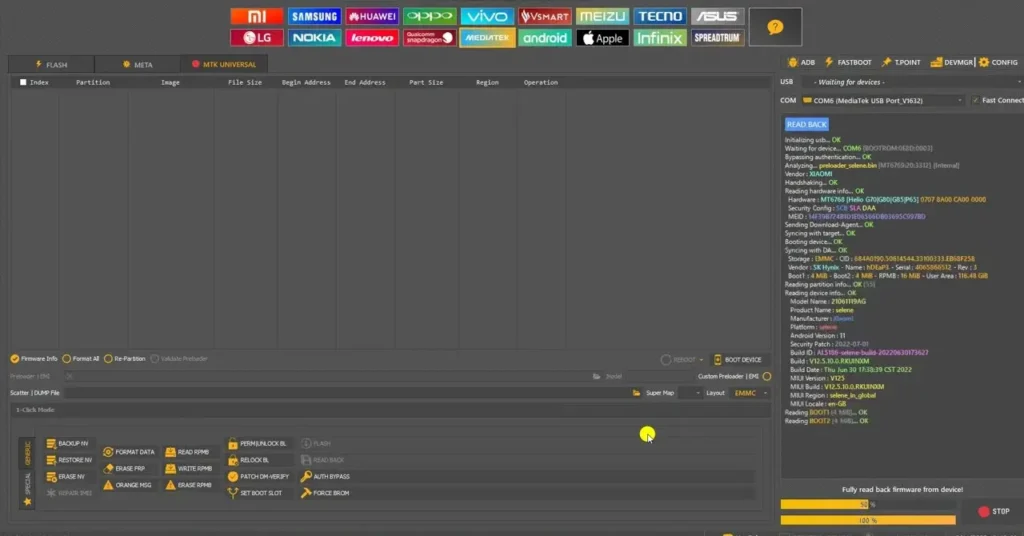
after download Selene dump backup file from download link , extract to your pc any location , open unlock tool 2026 Version , go Xiaomi Tab section , search Xiaomi Redmi 10 model from list and go flash section , this first method , but i recommended you go universal MTK tab section because Redmi 10 Selene MTK CPU device , and with unlock tool universal tab you select any MTK device for flashing ,you go scatter flash file tab and load your downloaded Redmi 10 selen dead boot dump file and click start , Unlock Tool ask you connect device , you power off your device and connect with volume -+ booting key , redmi 10 selene start to write dump file , under some minutes Dump file write done , your device reboot and show Xiaomi logo in screen , setup wizard your redmi 10 device after restore dump file.
Some Extra Tips
if you want fix your device redmi 10 prime IMEI problem , you need follow this important setup . because IMEI writing big Reason device go dead boot unbrick mode, if you want and ready to Repair IMEI redmi 10 prime then follow this 2 guide,
Advertisement
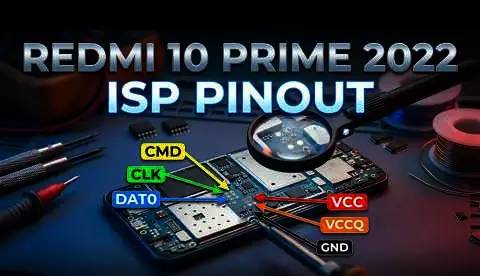
- Redmi 10 Prime ISP Pinout
some time writing IMEI prepossessing your device go dead boot mode , and you here try many method to fix your device , if you write wrong redmi 10 prime scatter flash file then your device not on and now not showing MTK port in device manager , here you need Redmi 10 Prime ISP Pinout image pictuers to find your device ISP Pinout points , because if your device not showing MTK port at mens your device permanently dead , and now only with Jtag you recover your redmi 10 prime selene device .
- Redmi 10 Prime NV Data File
this 2nd impotent setup befor writing IMEI in your device, mostly GSM Expert backup NV Data file befor repair IMEI any android devices, if you write IMEI your Redmi 10 Prime device your first read backup NV data and NV Ram . in case in repair IMEI your device go dead boot mode , and your write Unlock Tool dump file and recovery your device , some case after fix dead boot device show Null IMEI and null unknown baseband , if your device redmi 10 price show unknown baseband and null IMEI here work your Read backup NV file and NV Ram files.
FAQ
How do I fix my Redmi 10 Prime (Selene) if it’s completely dead and won’t turn on?
A dead Redmi 10 Prime after a bad flash is usually a software brick, not a hardware fault. The fix is a full dump file flash through Unlock Tool 2026 in BROM mode, which rewrites the corrupted partitions. In most cases the phone powers back on once the flash completes — no need to panic or replace the board.
My Redmi 10 Prime died after flashing. Can I repair it with SP Flash Tool or Unlock Tool?
Yes, both can work, but be careful with SP Flash Tool ,because only some % chance dead mode device recover with normal flash file. Unlock Tool 2026 is a advance tool , select the Selene dump file and write .
Where can I download the Redmi 10 Prime (Selene) full dump file for dead boot repair?
you download Redmi 10 Prime Selene Full dump file from downloadunlocktool.com official website. here dump file with full write dump file guide available free .
Advertisement
Can I repair a dead boot Redmi 10 Prime without opening the phone or using a test point?
yes and No, this two answer and both write , if device normal brick go dead boot you without opening write dump file via Unlock Tool 2026 Version , but if your device dead and not show MTK port this point you need open your device back cover and find ISP Pinout and write dump file with Jtag .