Unlock Tool 2026 – Realme C55 RMX3710 Full Dump File | Dead Boot Repair
Realme C55 RMX3710 Full Dump File: you can use it to repair the dead boot on your Realme RMX3710 phone. This Realme RMX3710 dump file is a read backup made with Unlock Tool, and you can write it back with Unlock Tool as well. The Realme RMX3710 dump file has no password, and you can download it with one click from the download button to fix your device’s problem.
Why the Realme RMX3710 Goes Dead After Flashing
This problem is seen quite often. The Realme C55 RMX3710 often dies after a flash. It gets hard bricked, won’t turn on, or keeps rebooting into auto recovery mode, and sometimes it shows up as an MTK USB port with a black screen. Today’s Realme RMX3710 dump repair file will help fix these problems.
Check Your Firmware Version Before Downloading:
Whenever you need to download a dump file or scatter flash file for a Realme RMX3710 C55 or any other model, the firmware version should match your device’s version. If the Android version doesn’t match, in most cases the device can show the same problems I described above. But this isn’t necessarily true for every device, because we can downgrade and upgrade any Realme device, even a Realme C55 RMX3710, as long as some tool supports booting it. If your Realme RMX3710 C55 is on Android 15 with UI 6.0, or on 14.0.0.2000, you can downgrade and upgrade it. RMX3710 firmware is available for both Android 15 and 14, and you can flash either one as you like.
RMX3710 Full Dump File Free Download
Today you can download the full Realme C55 RMX3710 dump file for free, without a password. I’ve used this file myself and it’s tested. You can also download the scatter flash file with the DA file. If you download the unlock dump file from the link above, you’ll have to write it with Unlock Tool 2026 only. If you download the RMX3710 scatter flash file, you can use Unlock Tool, SP Flash Tool, DFT Tool, or Pandora Tool Box.
Fix Auto Recovery Mode After Flash
If the Realme C55’s security patch is newer and you flash a mismatched Android version file, the device will go into auto recovery mode after flashing and keep rebooting over and over. To fix it, you’ll have to write the RMX3710 dump file with Unlock Tool, or flash the Realme C55 RMX3710 scatter flash file with the DA file using SP Flash Tool.
Common Problems and Fixes
Flashing a wrong or mismatched file on your Realme RMX3710 C55 can cause several problems, including stuck on logo, device not detected, flash failed, reboot to recovery, and a black screen showing only the MTK port. You may run into other kinds of problems too. The best way to fix all of these is to write the Unlock Tool dump file.
What You Need Before Flashing
- A Windows PC, the RMX3710 dump file from this post, Unlock Tool 2026, MediaTek USB drivers, a good USB cable, and a charged battery.
How to download and flash the Realme C55 dump file with Unlock Tool
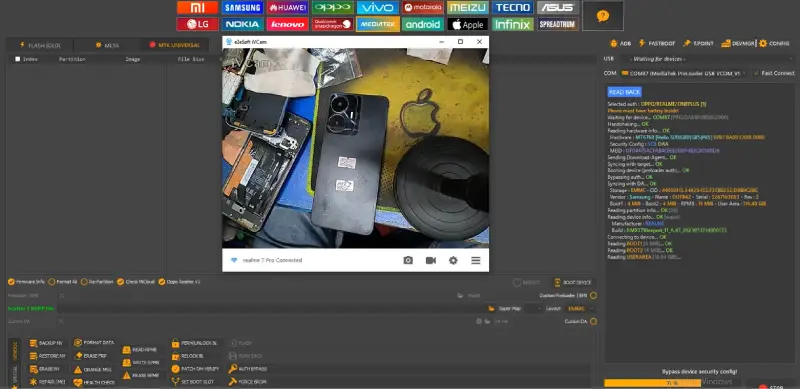
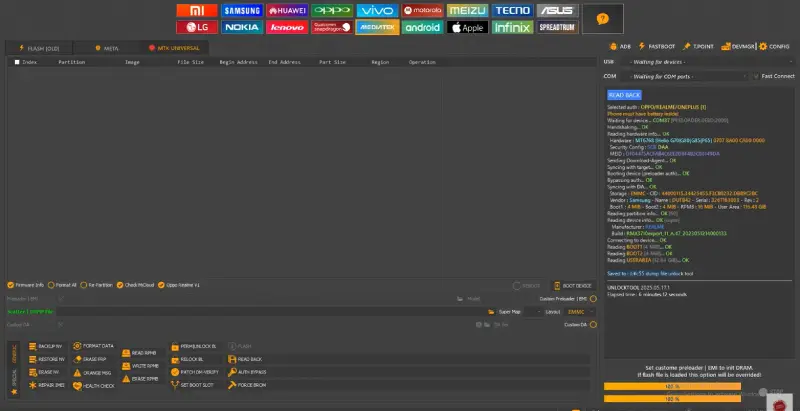
You can download the full Realme C55 RMX3710 repair dump file from the download link in this same post. Download it and extract it; it has no password. After extracting, open Unlock Tool, go to the MTK Universal tab, load the RMX3710 dump file, and click Flash. Connect the device in BROM mode with the boot keys (- and +). If the BROM key doesn’t work, connect it through the test point. As soon as it connects, the dump file will start writing. Once the dump is restored, the device will turn on. If it stays stuck on the logo or goes into recovery after turning on, unlock the RMX3710 bootloader through the test point, and then the device will turn on.
Advertisement
Flash with SP Flash Tool Scatter Dump File
Realme RMX3710 also has a scatter dump file, which you can flash with SP Flash Tool using a DA file. Download the Realme RMX3710 scatter dump file from the download link and load it in SP Flash Tool. Load the custom DA file and click Flash. Then connect the phone through the test point.
FAQ
Where is the RMX3710 test point?
The test point diagram is in the image above this FAQ. Open the back cover, short the point to ground, then connect the USB cable.
Do I need a DA file with Unlock Tool?
No. Unlock Tool uses its own server-side DA file, so you don’t need a separate one.
Can I flash this dump on Android 15 firmware?
Yes, this dump file supports the Realme C55 RMX3710 device
That’s the full process. If you get stuck, drop a comment with your exact error and I’ll help