Here’s what you’ll find in this article: “What Is Oppo A57 CPH2387 Dump File?” explains what this file actually is. “Dump File vs Flash File” clears up the difference between the two, so you don’t pick up the wrong one. “What Is Inside This File?” tells you what’s packed inside the file. The “Download Oppo A57 CPH2387 Dump File” section has all the download details. And last, “Before You Flash: Warning” is something you should read before you flash anything.
The download link for the Oppo A57 CPH2387 dump file is in the info table section, where you can grab it with a single click. No ZIP password needed.
Here’s what you’ll find in this article: “What Is Oppo A57 CPH2387 Dump File?” explains what this file actually is. “Dump File vs Flash File” clears up the difference between the two, so you don’t pick up the wrong one. “What Is Inside This File?” tells you what’s packed inside the file. The “Download Oppo A57 CPH2387 Dump File” section has all the download details. And last, “Before You Flash: Warning” is something you should read before you flash anything.
What Is Oppo A57 CPH2387 Dump File?
A dump file is a copy of a phone’s memory. When a technician takes the software from a working phone and saves it into one file, that file is called a dump. The Oppo A57 CPH2387 dump file works the same way, and it only fits this one model.
What It’s Used For
If your phone is dead, stuck on the logo, or keeps restarting, this file can be used to write the software back onto it. Repair shops often use it on phones with broken software. It usually works through an unlock tool. You run the tool on a computer, connect the phone with a USB cable, and send the file to the phone.
Who It’s For, and Who It’s Not For
This file is only for the CPH2387. If you install it on a different Oppo model, you could mess up the phone, and sometimes it won’t turn on again at all. You can find your phone’s model number in Settings, under About Phone. Only go ahead if it shows CPH2387.
Also keep in mind that it won’t fix every problem. If the screen is cracked or the battery is bad, a dump file won’t help. It’s only for software problems.
What Oppo A57 CPH2387 Means
CPH2387 is the model code for the Oppo A57, which came out in 2022. In stores the phone is sold as the A57, but when it comes to software, this code is what really identifies it. That’s why the file name always has CPH2387 in it.
Dump File vs Flash File
Both files are used to put software back on a phone, but they’re not the same thing. A dump file is an exact copy of a phone’s memory, while a flash file is a software package made by the company. If you understand the difference, you won’t waste time downloading the wrong file.
Main Difference
A dump file is taken from a working phone. It holds everything inside the phone in one piece, exactly as it was at that moment. A flash file is also called firmware, which is the software that runs the phone. It comes from the company or an official source, and it’s clean.
Here’s a simple example. A dump file is like a photocopy of a house that’s already standing. A flash file is like the house blueprint, which you use when you have to build from scratch. Both can get you a house, but the way you get there is different.
When people search, they usually type “A57 CPH2387 flash” or “CPH2387 flash file.” What they find there is usually firmware, not a dump file. So read the file name before you download anything.
When You Need It (Dead Phone, Boot Loop, Software Error)
If the phone is completely dead, won’t turn on, and shows no sign of life even on the charger, a dump file can help. In a boot loop, the phone reaches the logo and then keeps restarting again and again. With a software error, the phone does turn on, but apps keep closing or the system freezes.
For all three problems, it’s better to try the flash file (firmware) first. If that doesn’t work, or the software is so damaged that even the flash file can’t fix it, then move on to the dump file. This is based on our experience, not a strict rule.
To write either type of file to the phone, you need a tool like an unlock tool, which runs on a computer. After you download the file, you load it into that tool.
What Is Inside This File?
This file packs the phone’s software into one package. You should know what’s in it and which phone it’s for, or you could end up writing the wrong file to your phone.
File Details
A dump file holds data for the different parts of the phone. For example, the boot part, the system part, and the part that gives the phone its identity. These come as separate image files. There’s also a scatter file that lets the tool write them all to the phone together. A scatter file is a small text file that tells the tool which image goes into which part of the phone.
It’s only software data that runs inside the phone.
Phone
Details
Device
Oppo A57 4G
Model
CPH2387
Chipset
MediaTek ( MTK )
Android
12/13
File Size
16 GB
File Type
Scatter File / Unlock Tool Dump Format
Supported Model (CPH2387 Only, Not A57 2016 CPH1701)
This dump is only for the Oppo A57 CPH2387. There’s also an older A57 that came out in 2016, and its model code is CPH1701. Since the names are the same, people often think the two are one phone, but they’re completely different phones.
Using this file on a CPH1701 won’t help, and it could ruin the phone. In the same way, don’t use a CPH1701 file on a CPH2387.
Check your phone’s model code in Settings, under About Phone. If it says CPH2387, then this dump file is the right one for you. If the phone won’t turn on, the model code is also printed on the back of the phone or on the box.
Download Oppo A57 CPH2387 Dump File
The download button is in the Table Info section above, where the download link has been added. This is a dump file read with an unlock tool, and the total file size is 16 GB.
No ZIP Password Needed
Only download this file from an official source. Don’t grab it from an unknown website, a Telegram group, or any page with big “free download” buttons all over it. Pages like that often hide something else inside the file, or the file is incomplete. If an incomplete file is written to the phone, the phone can break again.
Check the file name. It should have CPH2387 in it. If the name shows a different model code, or has no name at all, don’t use that file.
After downloading, the file usually comes as a ZIP or RAR. You need WinRAR or 7-Zip on your computer to open it. Extract it to the Desktop or to a folder that has no Urdu letters or spaces in its name, because some tools can’t read those folders.
This dump file is completely free. You don’t need to pay anything for it. If a page asks for money, don’t take the file from there. Some unlock tools do cost money, but the dump file itself is free.
Before You Flash: Warning
Flashing is the kind of job where one mistake can cost you a lot. Before you start, understand the three risks so you don’t regret it later.
Risks: IMEI, Data Loss, Wrong Model File
The IMEI is the phone’s own ID number, and it’s how the network recognizes the phone. After a dump file is installed, the IMEI sometimes turns to zero, or you see “Invalid IMEI.” After that, the SIM gets no network and calls won’t go through. So don’t flash the NV / NVRAM part without thinking it through. Putting the IMEI back is a separate job, and a hard one.
Advertisement
Data loss is the most common damage. While flashing, the phone’s internal storage is written from scratch. Photos, contacts, and apps stored in it can be wiped, and getting them back is almost impossible. Assume that anything on the phone is already gone.
A wrong model file does the worst damage. If a file for any other model gets written to the CPH2387 Oppo A57, the phone won’t turn on again. So check the model code in the phone’s Settings and match it with the file name. Both should say CPH2387. During the flash, watch out for three things. Don’t let the cable come loose, don’t let the laptop battery run out, and don’t close the tool. If the job stops halfway, the phone can end up dead.
If you’re not sure what you’re doing, take the phone to a mobile repair shop. Flashing isn’t something to do by guessing.
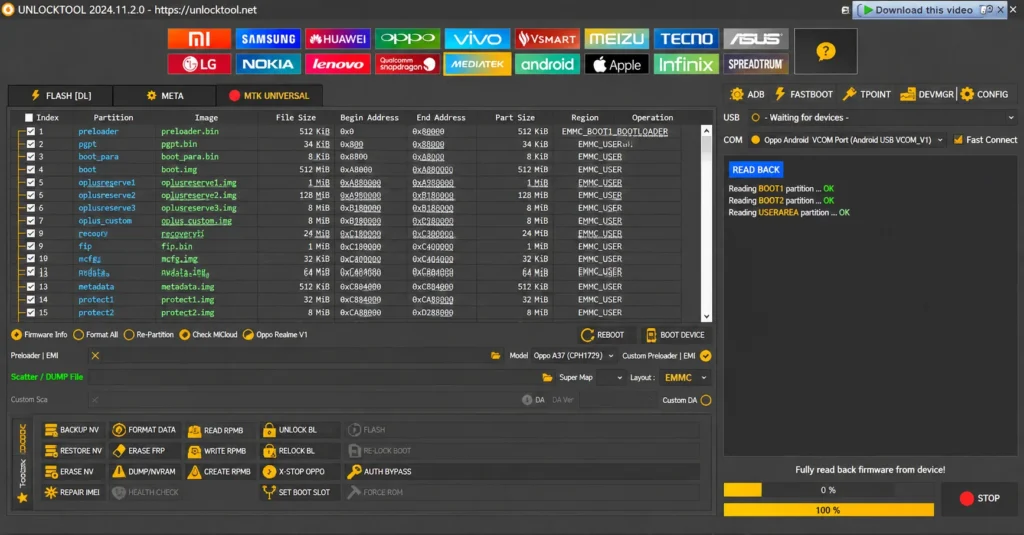
Write Oppo A57 CPH2387 Dump File With Unlock Tool
You need a few things ready before you write the dump file to the phone. How to Flash a Dump File: Read full guide →
First, you need a Windows computer or laptop. The file and the tool both run on it. Keep enough free space on the computer so the file can extract without problems.
Second, you need an Unlock Tool. This is the software that runs on the computer and sends the file to the phone over USB. Just downloading the file won’t do anything without it.
Third, you need a good USB cable. A cheap or loose cable can drop the connection in the middle of flashing, and this is the most common reason the job ends up half done. The original cable that came with the phone is better.
Fourth, the phone needs some charge. It should have at least half a battery. If the phone won’t turn on at all, put it on the charger for a while before you connect it to the computer.
Follow these five steps in order. Don’t skip any step, or the flashing can stop halfway. The menu names in your tool may be different, but the job stays the same.
Step 1: Extract the File
The file you downloaded will be a ZIP or RAR. Right-click it and choose Extract Here with WinRAR or 7-Zip. Once it’s extracted, you should see the image files and the scatter file inside the folder. Keep the folder on the Desktop so the path stays short.
Step 2: Open the Unlock Tool
Run your unlock tool on the computer. If the tool came with drivers, install those first. Then pick the flash or write option in the tool.
Step 3: Load the Dump File
Click the Browse or Load button in the tool. Go to the extracted folder and pick the scatter file. The tool will find the rest of the images on its own. Check the file name once more at this point and make sure it says CPH2387.
Step 4: Connect the Phone
Turn the phone off. Plug the USB cable into the computer and leave the tool ready. Then connect the phone with the cable. On some phones you have to hold down the volume button while connecting. If the phone won’t connect, you’ll need the Test Point method, which has its own separate steps.
Step 5: Start the Flash
Once the tool recognizes the phone, click Start or Download. The progress bar will begin to move. Don’t pull out the cable or close the tool while it runs. When the job is done, the tool will show a message like “Success” or “Done.”
Unplug the phone from the cable and press the power button to turn it on. The first startup can take a few minutes, so don’t panic.
Advertisement
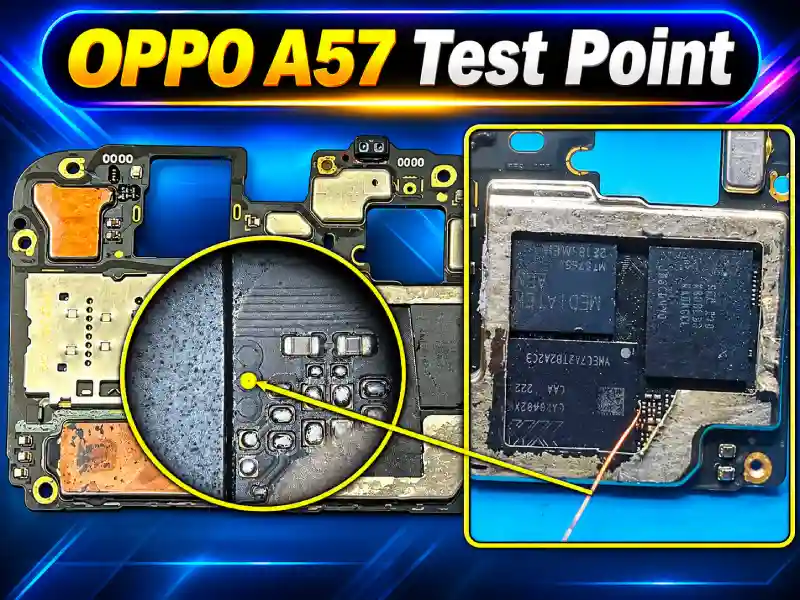
OPPO A57 CPH2387 Test Point
The OPPO A57 CPH2387 test point screenshot is attached above, so you can view it easily. You need to open the back cover of the Oppo A57 very carefully. Remove the screws on the board, and then remove the silver strip you see at the back of the board in the screenshot. Do it very gently so the hardware parts under the silver strip don’t come off.
The test point is very small, so connecting to it can be a bit hard. If you know hardware repair, solder a jumper wire to the test point and bring it out, then put the board back in its place. After that, disconnect the phone’s battery and connect it again. When “Waiting for device” shows up in the unlock tool, touch the jumper wire to the board’s ground and connect the USB cable to the computer. The device will boot through the test point, and the dump file will start writing.
FAQ
Will Flashing Erase My Data?
Yes. When you flash a dump file, the phone’s internal storage is written from scratch. Photos, contacts, and apps get wiped, and getting them back is almost impossible. If the phone still works and you want to keep some things, copy them off the phone before you flash.
Phone Is Still Dead After Flashing?
First, try a different cable and leave the phone on the charger for a while. Then hold the power button for 15 to 20 seconds. If it still won’t turn on, flash it again in the tool, this time using a different USB port. If that still doesn’t work, take the phone to a repair shop.
Can I Use This File on Oppo A57 (2016)?
No. The Oppo A57 (2016) has the model code CPH1701, while this file is only for the CPH2387. The names are the same, but they’re two different phones. If you use this file on the wrong model, the phone won’t turn on again.
Conclusion
If you have the right file, a good cable, and your tool ready, just check the phone’s model code one more time and get started. Don’t panic if the phone isn’t detected on the first try. Switching the port and cable and plugging it in again often fixes it. If the phone turns on after flashing, put in a SIM first and check the network and IMEI, then sort out the rest of the settings.