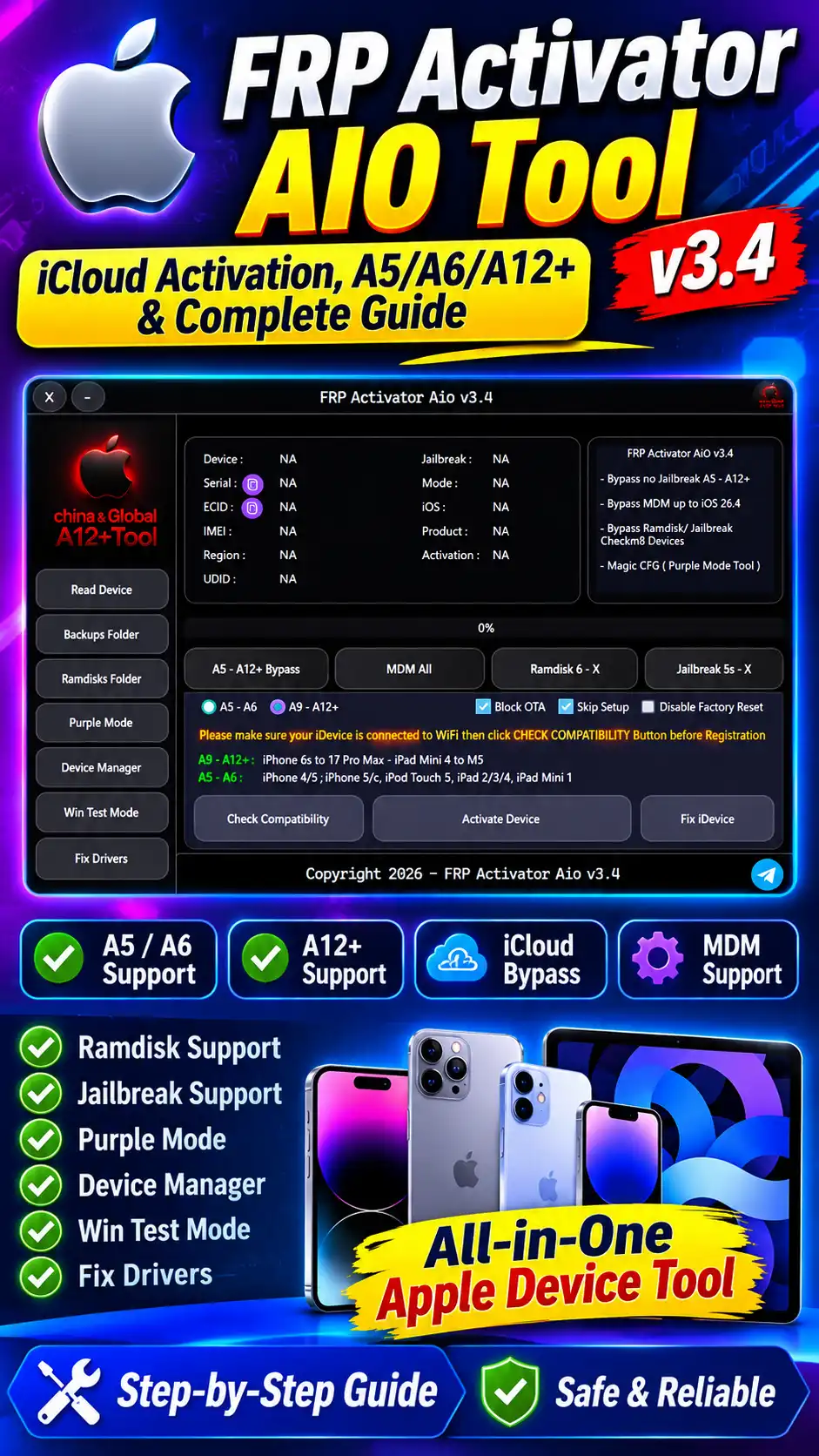
FRP Activator AIO v3.4 is a specialized Apple-device utility built to work with Activation Lock, MDM, and related device-management functions on supported iPhone and iPad models. The tool’s interface shows options for A5, A6, and A12+ device categories, along with Ramdisk, Jailbreak, and Purple Mode related options. In this article, we’ll cover FRP Activator AIO v3.4’s interface, supported device families, available features, compatibility requirements, device information fields, a high-level overview of the activation workflow, and common issues. Any Activation Lock or MDM operation should only be performed on an authorized device, in the context of legitimate ownership.
What Is FRP Activator AIO V3.4?
FRP Activator AIO v3.4 is an all-in-one Apple device utility that works with supported iPhone and iPad hardware across different service modes. Its interface offers multiple sections for reading device information, checking compatibility, and managing supported service functions. Despite having “FRP Activator” in its name, this particular interface focuses more on Activation Lock, MDM, Ramdisk, Jailbreak, and related servicing functions for Apple devices than on Android FRP. That’s why, when searching for this tool, related terms like FRP Activator AIO, A12+ Activator, iCloud Bypass Tool, Activation Lock Tool, and Apple device servicing might come up too.
FRP Activator AIO V3.4 Features
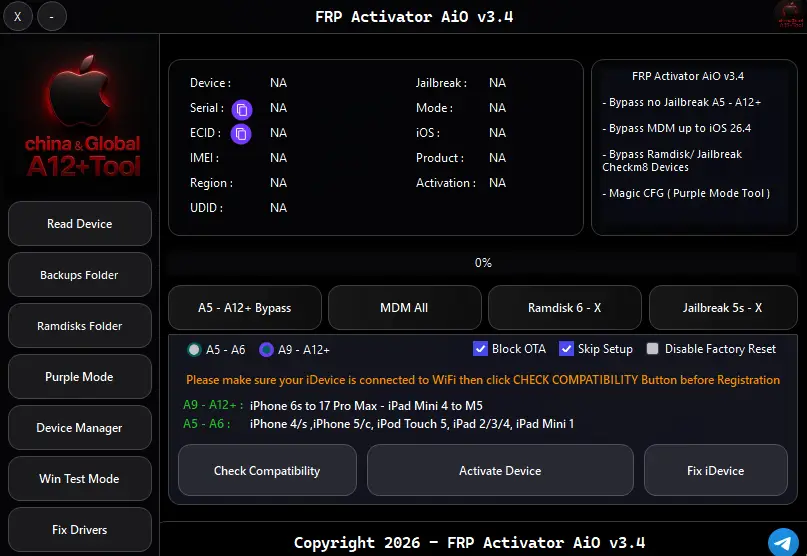
FRP Activator AIO v3.4’s interface has multiple service functions available. Based on the screenshot, the tool includes an A5–A12+ related bypass section, MDM All, Ramdisk 6–X, Jailbreak 5–X, Purple Mode, and device-management options.
The tool’s main visible functions also include options like Read Device, Backups Folder, Ramdisks Folder, Purple Mode, Device Manager, Win Test Mode, and Fix Drivers.
Read Device
The Read Device option’s purpose is to read the available identification information from the connected Apple device. The interface shows fields like Device, Serial, ECID, IMEI, Region, UDID, Jailbreak, Mode, iOS, Product, and Activation.
Check Compatibility
The Check Compatibility feature matters for verifying the supported device configuration before the service process. Compatibility can vary based on the device model, hardware generation, iOS version, and the available service method.
Activate Device
Activate Device is the interface’s main service action. In an authorized servicing environment, this option initiates the tool’s configured workflow, while the exact available operation depends on the connected device and the selected service mode.
Fix Device
The Fix Device option is provided in the interface for device-related servicing or supported recovery functions. This option’s exact behavior can differ depending on the tool version and the connected device’s status.
Fix Drivers
Correct USB drivers and communication components matter for Apple servicing tools. The Fix Drivers option is provided in the interface to resolve driver-related communication issues.
Supported Device Families
FRP Activator AIO v3.4’s screenshot clearly displays the A5, A6, and A12+ device categories. The tool’s actual compatibility range can vary based on the model, hardware generation, iOS version, and the current service implementation.
A5 iPhone Devices
The A5 category includes older Apple hardware generations. The compatibility information in the screenshot references the iPhone 4S, iPhone 5, iPod Touch 5, and selected iPad models.
A6 iPhone Devices
The A6 category is also part of the tool’s dedicated compatibility interface. This category can include some older iPhone and iPad hardware models, but exact compatibility should be verified through the tool’s Check Compatibility function and current release information.
A12+ iPhone Devices
The A12+ category is separately identified in the interface for newer Apple hardware generations. The screenshot shows context for devices like the iPhone XS, iPhone XS Max, iPhone XR, and iPhone 11 family.
iPhone Compatibility
The tool’s interface organizes different hardware generations into separate categories for iPhone servicing. Because of this, compatibility shouldn’t be assumed just by looking at the iPhone name, it’s necessary to verify the exact model and software configuration.
iPad Compatibility
The screenshot also references iPad and iPad Mini devices. Service availability can differ between older iPad generations and newer supported configurations.
iCloud Activation Lock and FRP Terminology
Treating iCloud Activation Lock and Android FRP as the same security mechanism isn’t technically correct, in the context of Apple devices. On Android, FRP stands for Factory Reset Protection, while on Apple devices, Activation Lock is a security feature related to the Apple Account and the Find My ecosystem.
The name FRP Activator AIO might have gotten popular because of search terminology, but on an Apple-specific page, clearly distinguishing terms like Activation Lock, iCloud, Hello Screen, MDM, and Apple device servicing is better for both semantic SEO and reader understanding.
MDM Support
The tool’s interface shows a dedicated “MDM All” option. MDM stands for Mobile Device Management, which lets organizations control configuration, policies, and restrictions on managed Apple devices.
MDM-related servicing should happen in the context of organization-owned or properly authorized devices. Removing an organization’s management controls through unauthorized means isn’t appropriate.
Ramdisk Features
The interface has a dedicated section called Ramdisk 6-X. Ramdisk-based servicing workflows can be associated with specific hardware and software configurations of Apple devices. Ramdisk compatibility isn’t universal. So it’s important to verify the model, iOS version, and available service method.
Jailbreak Support
The tool’s interface also shows a Jailbreak 5-X option. “Jailbreak” terminology is used in the context of Apple operating system restrictions and device-level servicing.
Jailbreak availability keeps changing based on hardware and iOS version, so support for a specific model should be verified through the current tool documentation or compatibility results.
Purple Mode
FRP Activator AIO v3.4 also has a dedicated Purple Mode button. “Purple Mode” is terminology used in the context of specific low-level diagnostic/service workflows for Apple hardware servicing.
This feature’s availability and functionality depend on the device generation and the tool’s implementation. Not every Apple device supports the Purple Mode workflow.
Device Information Panel
The tool’s central panel shows multiple identification values for the connected device.
- Device: The Device field is used to identify the connected Apple hardware.
- Serial Number: Serial Number is the device’s unique hardware identification value, and can matter for device verification in authorized servicing workflows.
- ECID : ECID is the Apple device’s unique chip-level identification value, used in some servicing and signing-related workflows.
- IMEI : On cellular iPhone and iPad models, IMEI represents the device’s cellular identity.
- UDID : UDID is the device’s unique identifier value, which can be used for device identification within the Apple ecosystem.
- iOS Version : The iOS field helps identify the operating-system version installed on the connected device.
- Activation Status : The Activation field is relevant for understanding the device’s current activation state.
FRP Activator AIO Workflow Overview
- FRP Activator AIO’s general servicing workflow is based on device detection, compatibility verification, authorized service configuration, and result verification.
- First, the technician should confirm the device’s ownership and authorization. After that, a compatible USB connection, correct drivers, and a supported operating-system environment are verified.
- Once the tool reads the connected device, it can show model, serial, ECID, iOS, and activation information. Based on this information, the supported service mode is identified.
- In the interface provided, there’s an option to initiate the service operation once compatibility is checked. During the actual processing, the device might reboot multiple times, which can be expected behavior in low-level servicing workflows.
- Exact activation-lock removal instructions or security-control bypass procedures aren’t being intentionally provided here; in an authorized repair environment, the technician should proceed according to the tool’s legitimate documentation and the device owner’s authorization.
Device Reboot During Processing
Multiple automatic reboots can occur during this kind of servicing workflow. Based on the workflow observed, the device might restart several times during the process, and the final status gets displayed according to the tool’s result. If the device doesn’t reboot at the expected stage, the USB connection, driver installation, device mode, and compatibility should be rechecked.
Advertisement
System Requirements
For a Windows-based servicing utility like FRP Activator AIO v3.4, a compatible Windows environment, a stable USB connection, and correct Apple device drivers matter. The system should be kept free from unnecessary USB disconnects, sleep mode, and background interruptions during servicing.
Recommended Environment
- Windows PC
- Stable USB connection
- Correct Apple device drivers
- Compatible iTunes/Apple components where required
- Supported device model
- Supported iOS version
- Stable internet connection where the tool/service requires online verification
Common Compatibility Problems
- The same service result can’t be expected on every device. Hardware generation, iOS version, security patch changes, service-side availability, and the selected mode can all affect compatibility.
- If the tool doesn’t identify the device, the first thing to check is the USB cable, USB port, drivers, and Device Manager status.
- If the device is detected but compatibility fails, the exact model and iOS version should be verified.
- If the device keeps restarting repeatedly during processing, the technician should verify the tool’s status and supported workflow instead of interrupting the process.
FRP Activator AIO v3.4 Compatibility Checklist
It’s useful to verify the following information before starting the service:
- Exact Apple model
- Hardware generation
- iOS version
- Serial number
- ECID
- UDID
- Activation status
- USB connection
- Windows driver status
- Selected service mode
- Current tool compatibility
This checklist can help reduce unnecessary failed attempts and device communication problems.
FRP Activator AIO vs Generic FRP Tools
Generic FRP tools usually target Android Factory Reset Protection, while the interface provided for FRP Activator AIO v3.4 shows Apple-focused functions. The presence of A5/A6/A12+ categories, MDM, Ramdisk, Jailbreak, and Purple Mode, which are all Apple-specific service terms, highlights that its use-case is different from a conventional Android FRP utility.
How FRP Activator AIO Handles the Activation Workflow
In FRP Activator AIO, before processing a supported Apple device, the device’s compatibility and identification information is verified first. The tool’s interface displays information like Serial Number, ECID, IMEI, UDID, iOS version, Activation status, and device mode.
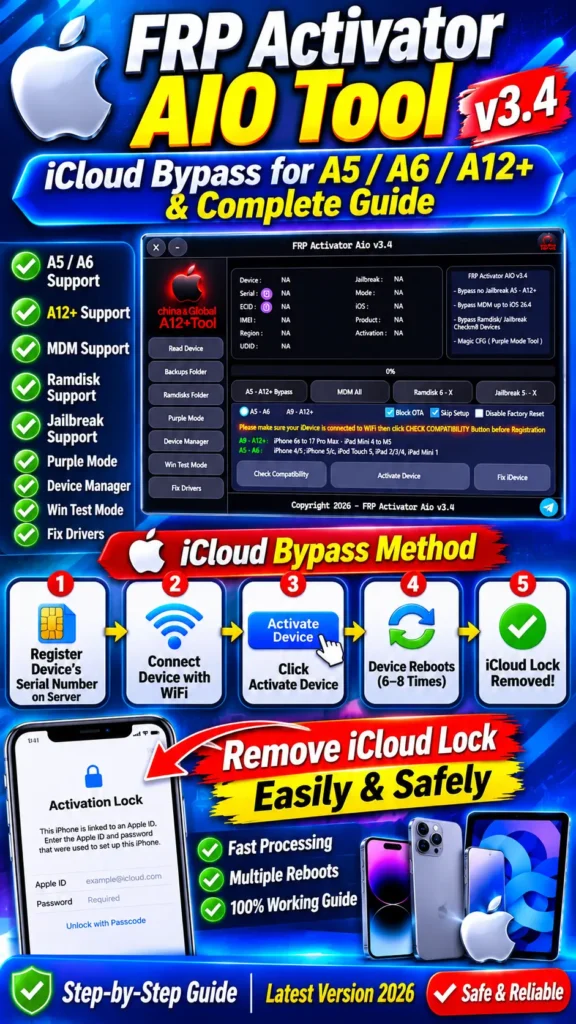
Device Serial Number Registration
In this workflow, a supported device’s identification information, including the serial number, can be used for service-side verification. Based on the tool’s workflow as provided, before processing a device, its identification is registered or authorized with the tool’s server/service system.
Connect the Apple Device to WiFi
After registration or authorization, the device is connected to the required network environment. Your tool’s interface also references a Wi-Fi connection, so a compatible network connection is an important part of the workflow.
Check Device Compatibility
After the device is connected, compatibility is verified. At this stage, checking the exact model, hardware generation, and iOS configuration matters, since the available functions for A5, A6, and A12+ devices can differ.
Activate Device
Once compatibility is successfully verified, the tool’s Activate Device function initiates the available workflow. At this stage, the tool can automatically handle the configured service process for the connected device.
Automatic Processing and Device Reboots
During processing, the device can automatically restart multiple times. In the observed FRP Activator AIO workflow, the device reboots several times, and the reported process can involve approximately 6–8 reboots. The reboot count can also differ depending on the device, iOS version, and current service implementation.
Final Activation Status
Once processing is complete, the tool shows the final device status. If an authorized device and supported configuration process successfully, the status of the activation-related restriction can change. The final result should be verified on the tool’s interface.
Important Compatibility Note
The same result isn’t guaranteed on every iPhone or iPad. Hardware generation, exact model, iOS version, device state, service availability, and tool version can all affect the result. That’s why checking compatibility before any service operation is necessary.
Authorized Device Use Only
Activation Lock is a device-security feature, so this type of servicing workflow should only be used on your own device, or on a properly authorized repair/service device. Removing another person’s or organization’s device security restriction without authorization isn’t appropriate.
What Is FRP Activator AIO Tool?
FRP Activator AIO Tool is an all-in-one device servicing utility that provides multiple service functions for supported Apple devices. The V3.4 interface shows A5, A6, and A12+ categories, along with MDM, Ramdisk, Jailbreak, and Purple Mode options.
What Is FRP Activator AIO v3.4?
FRP Activator AIO v3.4 is a specific release of this tool, which has Apple device detection, compatibility checking, and multiple servicing functions available.
Which Devices Does FRP Activator AIO Support?
Based on the interface provided, the tool targets A5, A6, and A12+ device categories. The exact model and iOS compatibility should be verified through the current release’s compatibility check.
Does FRP Activator AIO Support iPhone?
Yes, the interface provided shows compatibility categories for multiple iPhone generations. The exact support can change depending on the model and iOS version.
Does FRP Activator AIO Support iPad?
The tool’s interface also references iPad and iPad Mini devices. Exact compatibility should be verified through the current version’s compatibility check.
What Is A12+ Activator?
The term “A12+ Activator” is used in the context of servicing Apple’s A12 and newer supported hardware generations. The FRP Activator AIO v3.4 interface displays A12+ as a separate category.
Advertisement
What Is Purple Mode?
Purple Mode is specialized terminology for Apple device servicing, associated with low-level service workflows on some compatible hardware generations.
What Is Ramdisk in Apple Servicing?
Ramdisk refers to the concept of a temporary operating environment in Apple device servicing, which can be used in specific diagnostic or service workflows.
Does FRP Activator AIO Support MDM?
The tool’s interface has an “MDM All” option available. MDM functionality should only be used on properly authorized organizational devices.
Why Does the iPhone Reboot During Processing?
Low-level Apple device servicing workflows can involve multiple automatic reboots. If the reboot pattern differs from expected behavior, compatibility, drivers, USB connection, and the selected service mode should be verified.
Is FRP Activator AIO the Same as an Android FRP Tool?
No. Android FRP stands for Factory Reset Protection, while on Apple devices, Activation Lock is a different security mechanism. Despite the name FRP Activator AIO, the v3.4 interface provided shows Apple-focused functions.
Safety and Authorization
Activation Lock aur MDM device-security mechanisms hain. Kisi device par servicing se pehle ownership ya authorized service permission verify karna zaroori hai. If the device belongs to another person, company, or organization, security restrictions shouldn’t be attempted to be removed without proper authorization.
Final Verdict
FRP Activator AIO v3.4 appears to be a multi-function Apple device servicing utility, with A5, A6, and A12+ categories, along with MDM, Ramdisk, Jailbreak, Purple Mode, device reading, compatibility checking, and driver-management options available.
This tool’s actual capability can vary based on the device model, hardware generation, iOS version, and the current service implementation. That’s why verifying the exact device information and compatibility status before any service operation is the most important step.
If you’re publishing an SEO page for FRP Activator AIO v3.4, rather than just targeting the “download” keyword, covering the tool’s features, A5/A6/A12+ compatibility, iCloud Activation Lock terminology, MDM, Ramdisk, Jailbreak, Purple Mode, device information, and troubleshooting as a comprehensive topical resource is the more useful approach.